Buying guides
Best embroidery machine for a small business: single-needle or multi-needle?
Choosing an embroidery machine for a small business: when a single-needle PE900 is enough, when to step up to a PRS100 or 6-needle PR680W, and the time math to do first.
As an Amazon Associate I earn from qualifying purchases. It does not change the price you pay. How we handle links.
Our picks at a glance
Full pros, cons & specs for each ↓Quick answer
If you are testing whether people will buy your embroidery, start with a single-needle 5 × 7 machine like the Brother PE900 (or the SE2000 if you also sew) and track your time per item. Step up to the NQ1700E for bigger designs, the PRS100 for caps and free-arm items, or a multi-needle machine like the 6-needle PR680W once color changes and order volume, not design size, are what slow you down. Do the time math before you buy.
- A single-needle 5 × 7 machine is a low-risk way to test demand before buying production equipment.
- On a single-needle machine, every color is a stop you must attend; that is the real limit on output.
- Brother lists the PR680W with six needles, automatic color changes and cap frame capability.
Jump to a section
Our shortlist
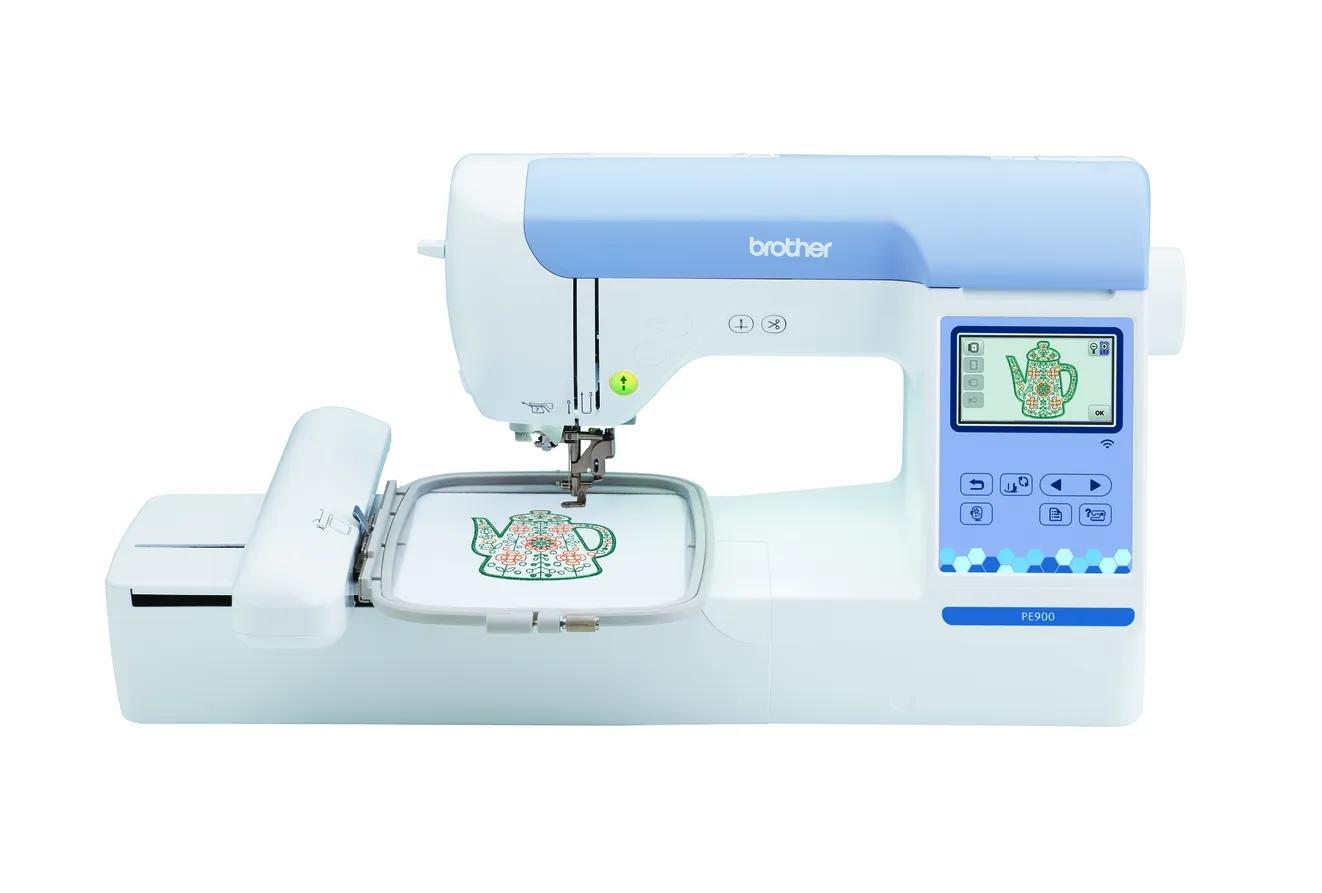
Brother PE900
Best for: Beginners who already sew (or do not need to) and want room for T-shirt fronts, totes and most popular design sizes.
- Field5 × 7 in (130 × 180 mm)
- TypeEmbroidery only
- Built-in designs193
- Max speed650 spm
- TransferUSB, Wi-Fi, Artspira app
Why pick it
- 5 × 7 field fits most popular design sizes
- Up to 650 spm
- Wireless transfer, Artspira and jump stitch trimming
Think twice if
- No sewing functions
- Single needle: you re-thread for every color
- Designs over 130 × 180 mm need splitting and re-hooping
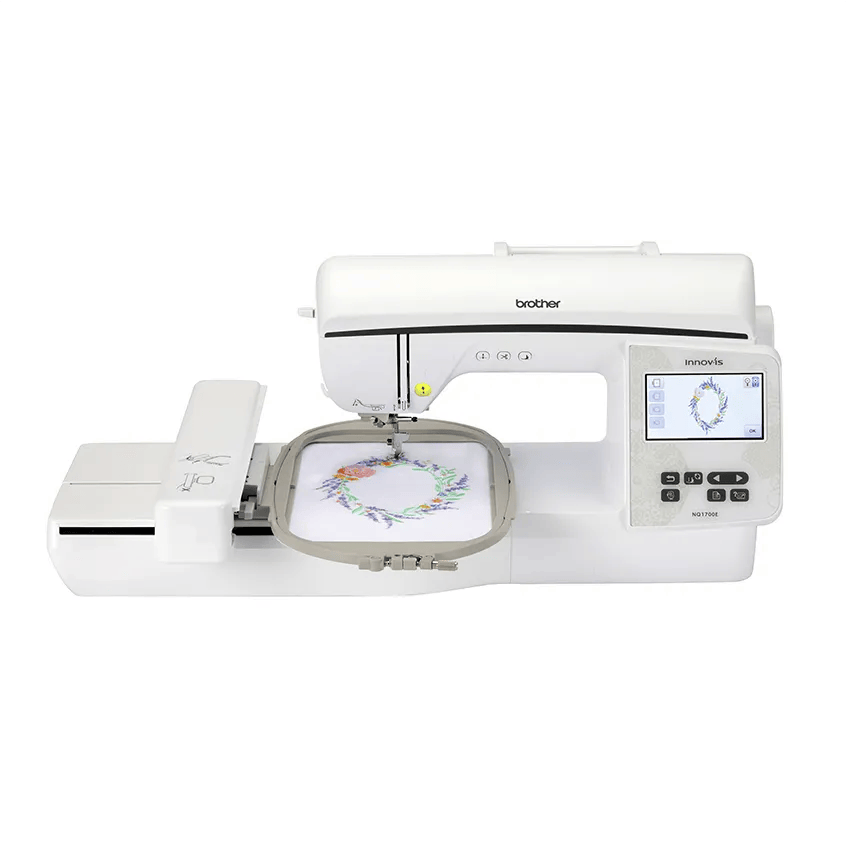
Brother NQ1700E
Best for: Beginners who already know they want bigger designs (jacket backs, larger quilt blocks) without re-hooping.
- Field6 × 10 in (160 × 260 mm)
- TypeEmbroidery only
- Built-in designs258
- Max speed850 spm
- TransferUSB, Wi-Fi, Artspira app
Why pick it
- 6 × 10 field: about 78% more area than 5 × 7
- Up to 850 spm
- Both 6 × 10 and 5 × 7 frames included
Think twice if
- No sewing functions
- More machine than many beginners need
- Still single needle
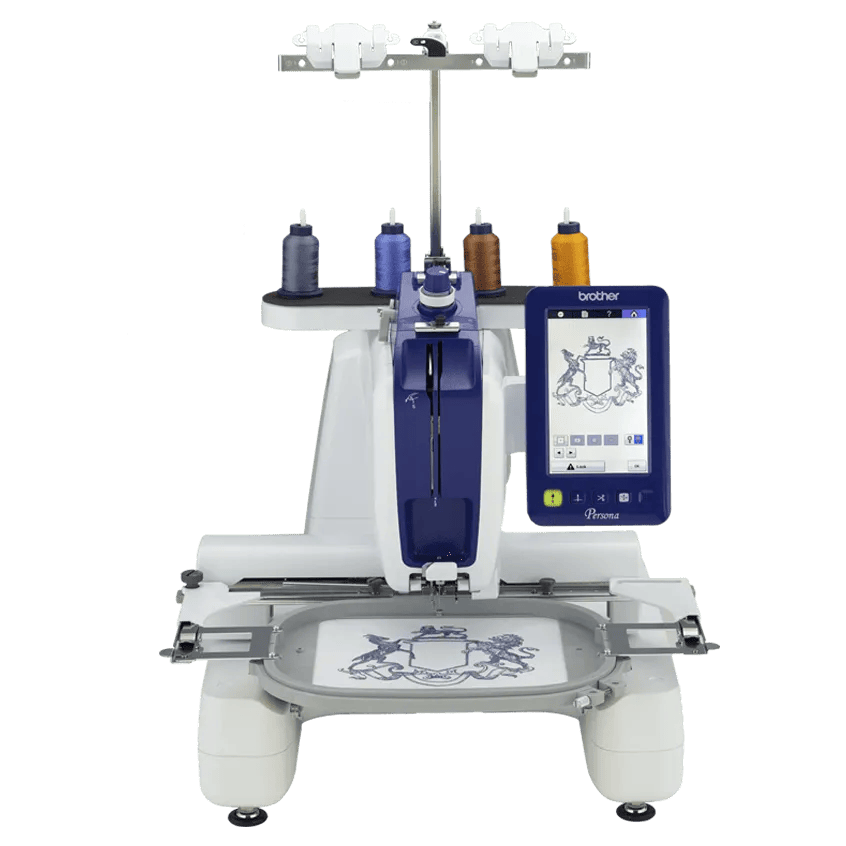
Brother PRS100 (Persona)
Best for: Hobbyists and small sellers who want hats, sleeves and bags on a single-needle machine with a free arm.
- Field8 × 8 in (200 × 200 mm)
- TypeEmbroidery only
- Built-in designs445
- Max speed1000 spm
- TransferUSB
Why pick it
- Cap frame capable with a free arm
- 8 × 8 field and up to 1,000 spm
- Six frames included
Think twice if
- Single needle despite the commercial styling
- USB only, no wireless listed
- Brother’s page lists both 445 and “over 405” designs
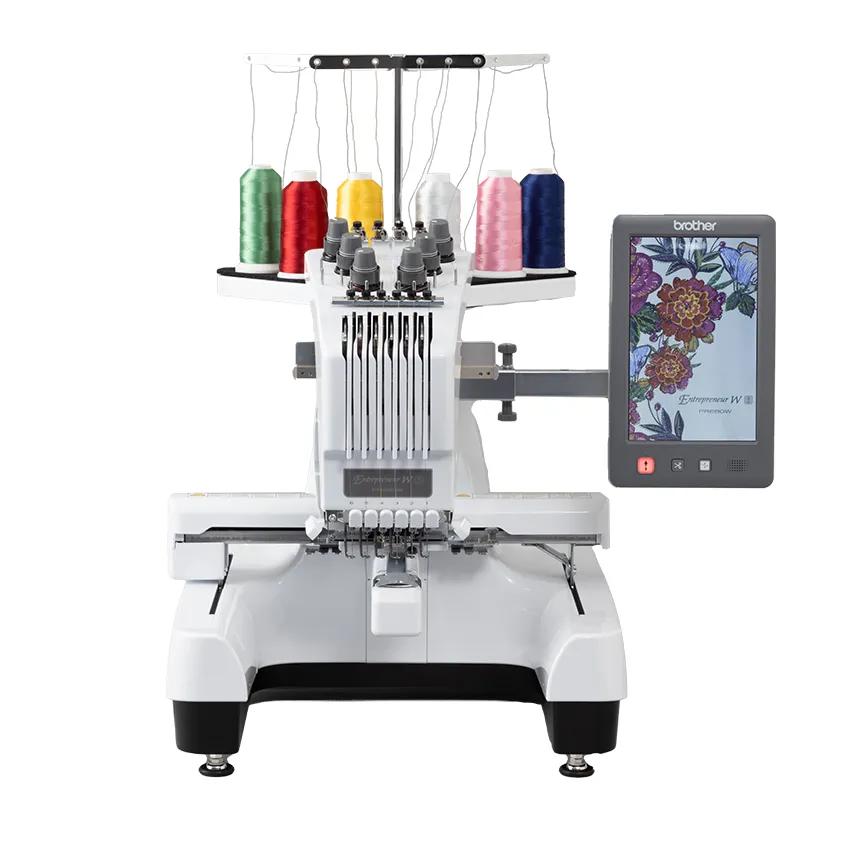
Brother PR680W
Best for: People starting an embroidery business who need hats, faster multi-color runs and less babysitting.
- Field8 × 12 in (200 × 300 mm)
- TypeEmbroidery only
- Built-in designs100
- Max speed1000 spm
- TransferUSB, Wi-Fi
Why pick it
- Six needles with automatic color changes
- Cap frame capable
- 8 × 12 field and up to 1,000 spm
Think twice if
- A big step up in cost and footprint
- More to learn than a home machine
- Overkill for occasional hobby use
The best embroidery machine for a small business is not automatically the biggest one you can afford. A machine you can’t keep busy is a cost, not an asset. The right machine is the one that matches the orders you actually get, with a clear point at which you’d upgrade.
This guide gives you that framework: start points, upgrade triggers and the time math to check it. It uses Brother’s published specs only. We don’t make income claims, because results depend on your market, prices and hours.
Should a small business start with a single-needle or multi-needle machine?
The difference that matters for a business is not stitch quality; it is attention. A single-needle machine stops at every color and waits for you to re-thread. A multi-needle machine like the PR680W, which Brother lists with six needles, changes colors on its own.
| Situation | Start with | Why |
|---|---|---|
| Testing demand, mostly flat items, varied one-off orders | PE900 or SE2000 | Lower upfront cost, 5 × 7 field covers most chest designs |
| Orders often need designs larger than 5 × 7 | NQ1700E | 6 × 10 field, up to 850 spm |
| Hats, sleeves and bags are a core product | PRS100 | Free arm, cap frame capability, 8 × 8 field, still single needle |
| Repeat multi-color orders and hats in volume | PR680W | Six needles, automatic color changes, cap frame capability, 8 × 12 field |
Our single vs multi-needle guide covers the hardware differences in more detail.
How do you do the time math before buying?
Time per item is what turns a hobby into a business, or doesn’t. It has four parts:
- Stitching time: stitch count divided by the speed the machine actually runs. Maximum speed is a ceiling, not an average, so apply an efficiency factor.
- Color changes: on a single-needle machine, each change is a stop and a re-thread.
- Setup and finishing: marking, hooping, trimming jump stitches, removing stabilizer, pressing and packing.
- Attendance: whether you can do something else while the machine runs.
A worked example (illustrative numbers only)
Say you stitch a left-chest logo of 8,000 stitches with four colors on a run of 24 shirts. These assumptions are examples, not measurements: machines run at 80% of their listed maximum on average, each single-needle color change takes 1 minute, the 6-needle machine has all four colors pre-threaded so changes add no attended time, and setup and finishing take 8 minutes per shirt.
| Machine | Listed max speed | Stitching | Color changes | Setup | Per shirt | 24 shirts |
|---|---|---|---|---|---|---|
| PE900 / SE2000 | 650 spm | 15.4 min | 3 min | 8 min | 26.4 min | about 10.6 h |
| NQ1700E | 850 spm | 11.8 min | 3 min | 8 min | 22.8 min | about 9.1 h |
| PRS100 | 1,000 spm | 10.0 min | 3 min | 8 min | 21.0 min | about 8.4 h |
| PR680W | 1,000 spm | 10.0 min | 0 min | 8 min | 18.0 min | about 7.2 h |
Two things stand out. First, setup and color changes are a large share of the total, so speed alone doesn’t decide it. Second, the table understates the multi-needle advantage: on the single-needle machines you have to be present for every color change, while a multi-needle machine can run a whole design while you hoop the next shirt.
Plug in your own designs with the stitch time calculator. It takes stitch count, speed, efficiency, color changes and setup minutes. Our guide to how long machine embroidery takes explains each input.
How does time connect to pricing?
Once you know minutes per item, you can price for them. The pricing calculator combines materials, labor time, overhead and a true margin, and our guide to pricing machine embroidery walks through it.
Don’t forget consumables that scale with volume. Madeira puts the lifespan of a machine embroidery needle at about 8 hours of running time, and stabilizer, thread and bobbins are used on every piece. For items that get washed hard, such as uniforms, Madeira positions its Polyneon polyester thread as resistant to chlorine bleach.
Brother PE900: the low-risk start
Brother lists the PE900 with a 5 × 7 field, 193 designs, 13 fonts, up to 650 spm, Wi-Fi, Artspira and jump stitch trimming. Jump stitch trimming matters for business work because it reduces hand trimming between sections.
Who it’s for: new sellers testing demand with personalized gifts, small batches of shirts and totes, and one-off custom orders.
Skip it if: hats are a core product, or most orders are multi-color logos in quantity.
What you give up: automatic color changes, a free arm and cap frame capability. If you also need to sew products (pouches, bags, quilts), the SE2000 has the same embroidery specs plus 241 sewing stitches.
Brother NQ1700E: bigger designs without going commercial
Brother lists the NQ1700E with a 6 × 10 field, 258 designs, 13 fonts, up to 850 spm and a 4.85 inch screen, with both 6 × 10 and 5 × 7 frames.
Choose it if customers ask for larger designs like jacket backs or large tote graphics. Skip it if your orders are mostly left-chest logos; field size doesn’t help there, and it is still single needle and flatbed. The PE900 vs NQ1700E comparison covers the trade-off.
Brother PRS100: caps and free-arm items
The PRS100 Persona is single needle, but built differently from flatbed home machines. Brother lists an 8 × 8 field, up to 1,000 spm (400 to 600 on cap frames), a 7 inch LCD, USB transfer, a free arm for “caps, sleeves and bags” and cap frame capability.
Choose it if hats, sleeves or bags are a meaningful part of your product mix but your volume doesn’t justify multi-needle yet. Skip it if you mostly do flat items. Note that it is USB only; Brother doesn’t list wireless.
Brother’s new PR1X lists a similar single-needle, free-arm, cap-capable approach with an 8 × 12 field and no Wi-Fi. It is worth comparing if you want a larger field.
Brother PR680W: the production step-up
Brother lists the PR680W with six needles, an 8 × 12 field, up to 1,000 spm, a 10.1 inch touchscreen, Wi-Fi and cap frame capability. Included hoops listed are 1.5 × 2, 8 × 12, 5 × 7 and 4 × 4 inches; the cap frame isn’t in that list, so budget for it if you plan hats.
Choose it if you regularly run multi-color designs in quantity, take hat orders, or your time at the machine is the bottleneck. Skip it if you haven’t yet confirmed demand. It is a big step in cost and footprint, and more to learn than a home machine.
Should you buy two single-needle machines instead of one multi-needle?
Some sellers consider running two home machines side by side. It can make sense if you need redundancy (one machine in for service doesn’t stop all orders) or want one machine on 5 × 7 work and another on a different hoop.
The catch is attention. Two single-needle machines mean twice as many color-change stops to attend, often at the same moment. If your bottleneck is time at the machine, two single-needle machines can make it worse, while one multi-needle machine addresses it directly. If your bottleneck is hooping and finishing, a second machine helps more.
Do Wi-Fi and screen size matter for a business?
They matter more than for a hobbyist, because you load and edit designs many times a day. Brother lists Wi-Fi on the PE900, SE2000, NQ1700E and PR680W, while the PRS100 is USB only and the PR1X lists no Wi-Fi.
Screen sizes step up from 3.7 inches (PE900, SE2000) to 4.85 inches (NQ1700E), 7 inches (PRS100) and 10.1 inches (PR680W). A larger screen makes on-machine lettering edits and placement checks easier, which is useful for name-personalization orders. Our monogramming machine guide covers lettering features.
When is it time to upgrade?
Watch for these signals in your own records rather than guessing:
- You are turning down hat orders, or doing them as patches when customers want direct embroidery.
- Color changes, not stitching, are where your time goes.
- You regularly run the same logo on many items.
- You need to be at the machine during hours you’d rather spend on sales, hooping or finishing.
- Most rejected requests are about design size (that points to a larger field, not necessarily more needles).
If none of these apply, a bigger machine probably won’t make you more money. Our guide on whether an embroidery business is worth it covers the wider questions, and the startup cost guide and startup budget calculator help you size the upfront spend.
What do you give up at each level?
| Machine | You gain | You give up |
|---|---|---|
| PE900 | Low entry, 5 × 7, Wi-Fi, jump trimming | Caps, free arm, auto color changes |
| SE2000 | Same embroidery plus sewing | Same limits as PE900 |
| NQ1700E | 6 × 10, 850 spm | Caps, free arm, auto color changes |
| PRS100 | Caps, free arm, 8 × 8, 1,000 spm | Auto color changes, Wi-Fi |
| PR680W | Six needles, caps, 8 × 12, Wi-Fi | Low upfront cost, small footprint |
Before you buy any business machine, check the warranty terms for commercial use with the seller, since home-machine warranties may be written for domestic use.
Spec comparison
| Model | Field | Type | Designs | Max speed | Transfer | Shop |
|---|---|---|---|---|---|---|
| Brother PE900 | 5 × 7 in | Embroidery only | 193 | 650 spm | USB, Wi-Fi, Artspira app | Check price ↗ |
| Brother SE2000 | 5 × 7 in | Sewing + embroidery | 193 | 650 spm | USB, Wi-Fi, Artspira app | Check price ↗ |
| Brother NQ1700E | 6 × 10 in | Embroidery only | 258 | 850 spm | USB, Wi-Fi, Artspira app | Check price ↗ |
| Brother PRS100 (Persona) | 8 × 8 in | Embroidery only | 445 | 1000 spm | USB | Check price ↗ |
| Brother PR680W | 8 × 12 in | Embroidery only | 100 | 1000 spm | USB, Wi-Fi | Check price ↗ |
Frequently asked questions
Can you start an embroidery business with a single-needle machine?
Yes, many people test demand that way. The limit is time: on a single-needle machine you stop and re-thread for every color, so multi-color orders in quantity take much longer to run and need you at the machine.
When should I upgrade to a multi-needle machine?
When color changes and order volume, rather than design size, are what limit you: for example, regularly running the same multi-color logo on many items, or turning down hat orders. Track your actual time per item first.
Is the Brother PRS100 a multi-needle machine?
No. Brother lists it as a single-needle machine. It adds a free arm, an 8 × 8 field, up to 1,000 spm and cap frame capability over flatbed home machines.
How long does it take to embroider a shirt?
It depends on stitch count, machine speed, color changes and hooping time. Our stitch time calculator estimates it from your own numbers; the worked example in this guide shows how the parts add up.
How much can I make with an embroidery machine?
We don’t make income claims; it depends on your market, pricing and time. Use the pricing calculator to set prices that cover materials, labor and overhead, and the startup budget calculator to see your upfront cost.
Sources & method
This guide is compiled from manufacturer documentation and specialist sources, not hands-on testing. We link every source so you can check it. Specifications change, so confirm details against your exact model manual. How we research.